

QR Codes on Cosmetic Packaging: What Should Customers See After Scanning?
A QR code on a skincare carton is an invitation. Make the destination useful: help customers understand the product, use it correctly and find answers without searching your whole website.
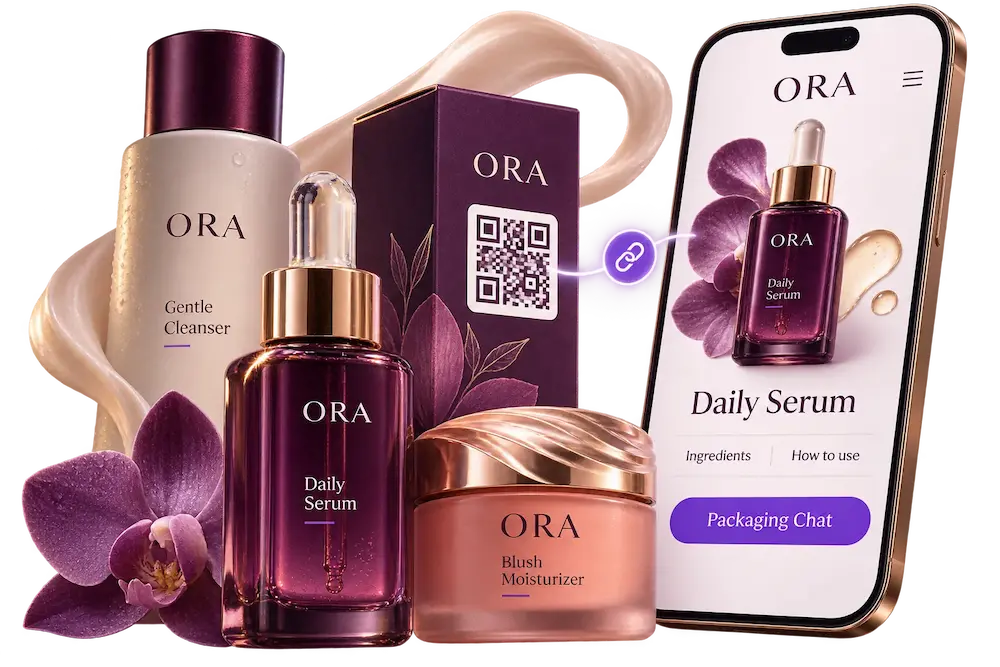
1. Start with the questions customers actually ask
People do not scan a bottle because a brand has more content to publish. They scan because they want to know something: what is inside, how to apply it, how to store it or where it belongs in a routine. Choose one useful promise for the packaging, such as Scan for ingredients and usage tips.
Link directly to the correct product and variant. A visitor holding a serum should not have to search a homepage or navigate a catalogue to find that serum. See how connected packaging for cosmetics and skincare can bring this information together.
2. Make ingredients and product details easy to read
Present the ingredient list supplied by the brand, the product’s purpose, format and relevant precautions in a clear mobile layout. Explain ingredient roles only with information your team has checked. Keep descriptions consistent with the packaging and current formulation.
- Use the exact product name and a recognizable pack image.
- Keep the full ingredient list separate from marketing highlights.
- Give documents meaningful names and check that they apply to this product.
- Make it easy to contact the brand when the information is insufficient.
A digital page should complement the physical label. Do not assume adding a QR code lets you remove required packaging information; check the requirements of each market.
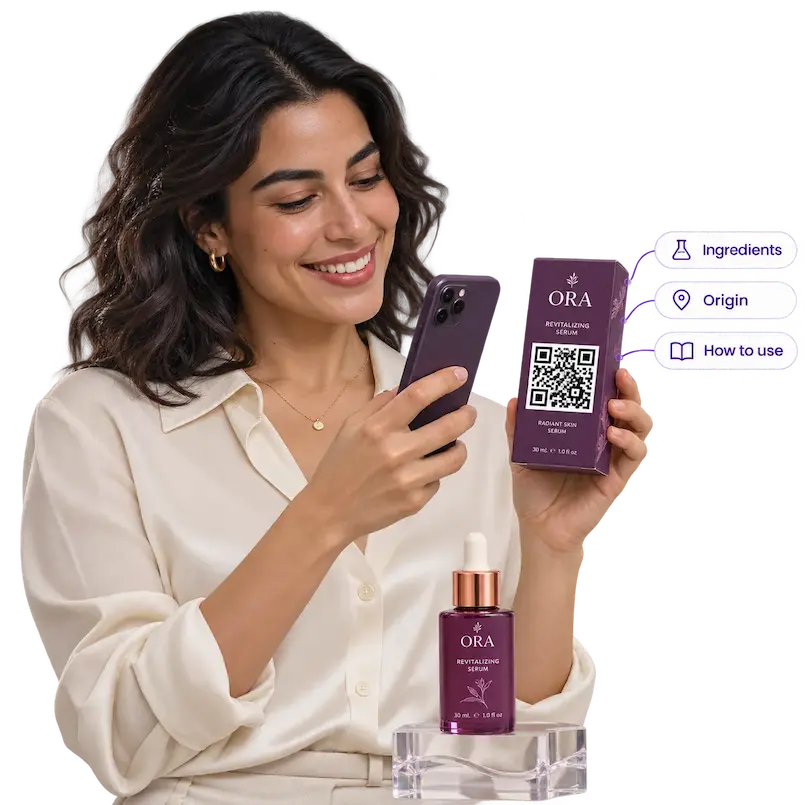
3. Show how to use the product
A short demonstration can explain an application step more clearly than a long paragraph. Show the brand-approved method, with readable captions and an alternative text explanation. Avoid starting a video automatically or making essential instructions available only inside a video.
A routine can also help customers understand the order of products. For example, a fictional moisturizer page might show where the cream sits in a simple routine and link to related products. Any frequency, amount or compatibility advice must come from the brand’s validated instructions, rather than a generic skincare template.
4. Use Packaging Chat for product-specific questions
Some visitors will still have questions after reading the page. Packaging Chat can provide a conversational way to explore the product information added by the brand: usage, ingredients, storage or available documents.
Prepare accurate source content before enabling the assistant. Test questions with known answers, questions the product data cannot answer and requests for medical advice. The assistant should make its limits clear and direct users to the brand or an appropriate professional when necessary. It should not invent a certification, promise a result or diagnose a skin condition.
5. Build a clear mobile experience and test the pack
Keep the first screen focused on the product name, image and main actions. Use descriptive buttons such as Ingredients, How to use and Product documents. Offer language options appropriate to your audience, with reviewed translations.
For the printed QR code, preserve its clear surrounding margin, sufficient contrast and an accessible position away from folds. Test the final packaging with several phones and realistic lighting before production. GS1’s printing guidance explains why these details matter.
Also check the destination: does it load, show the right variant and display correctly on a small screen? Test both the carton and the container if you print a code on each. A working digital link on a screen is not a substitute for a print test.
6. Learn from use and keep the content current
Review product-page visits, recorded interactions and recurring questions. These can suggest missing instructions or difficult-to-find information. A scan is an interaction, not proof of a sale, and repeated scans do not necessarily mean different people.
Review content when instructions, packaging or documents change. Updating a page without reprinting the QR code is useful, but older packs may remain in circulation. If a formula changes, preserve accurate information for earlier versions instead of showing the newest formula to every customer.
Explore Dipacking’s product pages, Packaging Chat and analytics features. For another practical example, read our guide to QR codes on food packaging.
Frequently asked questions
Should the QR code open my homepage or a product page?
Use the product page when the promise concerns ingredients, instructions or product documents. It removes an unnecessary search step. A homepage can remain a secondary link.
Can I change the content after the packaging is printed?
Yes, if the printed link continues to point to a product page you can update. Keep information accurate for the versions of the product still being sold.
Will adding a QR code increase sales?
A QR code can make helpful information easier to access, but it does not guarantee scans or sales. A clear reason to scan, useful content and a reliable experience all matter.
Start with one cosmetic product
Build a focused product page with useful information before rolling out QR codes across your range.